

AI··Task: Prompt guidelines
A good AI··Task prompt treats Instructions like the agent’s job description and Input like today’s case file. Put role, rules, and constraints in Instructions. Put the task, data pills, and the expected result shape in Input. When a later step must consume JSON, also set Output format to JSON in Settings — do not rely on prompt text alone. That split keeps standing rules sticky while each run’s data stays disposable and easy to parse downstream.
When to use
Section titled “When to use”- You already know how to add an AI··Task and need prompt structure, not step setup.
- The task must return a fixed shape (JSON or a fixed outline) for downstream steps.
- Prefer AI··Task: A simple guide for adding the step, choosing a model, tools, and memory.
Before you begin, open an AI··Task on the Input tab. If Instructions is not visible for your organization, put standing rules at the top of Input and keep run data below them.
Separate Instructions from Input
Section titled “Separate Instructions from Input”Instructions are the agent’s job description. Input is today’s case file.
Mixing them is the failure mode to avoid. If you paste this run’s payload into Instructions, the model can treat that one case as permanent policy — or let a malicious field try to rewrite your rules. If you bury role and never-do rules only in Input, you rewrite them on every run, and memory can keep one-off task text you meant to throw away. Instructions are not stored in memory; Input can be when memory is on.
Put role, standing rules, and reusable reference tables in Instructions. Put this run’s data, context fields, and
the expected output shape in Input. For example, a severity scale belongs in Instructions; the current payload
belongs under #RESOURCES in Input.
On the Input tab, Mindflow gives you both surfaces in the rich text editor. Instructions are optional —
keep them short and stable (formatting such as headings and lists is fine; no data pills). Input supports
formulas: type / to open the data picker and insert a data pill. Toggle Edit as raw markdown on either field
when you want to edit the stored markdown source.
Open the Input tab. Select the AI··Task, then open Input.
Write Instructions. Describe who the agent is and which rules it must follow on every run. Format for readability if it helps; do not paste run payloads or data pills here.
Instructions (example) You are an IT assistant that creates incident tickets.- Use only the incident fields supplied in Input.- Keep a neutral, professional tone.- Never invent ticket IDs or fields that were not provided.- Return the schema requested in Input.Write Input. Describe this run’s job, insert data pills for live values, and lock the result shape in
#RESULT. For JSON consumers, also set Settings → Output format → JSON (next section).Input (example) #TASKCreate an incident ticket from the provided data and return the ticket ID.#RESOURCESincident: [data pill from Receive incident]#RESULT{"ticket_id": "string"}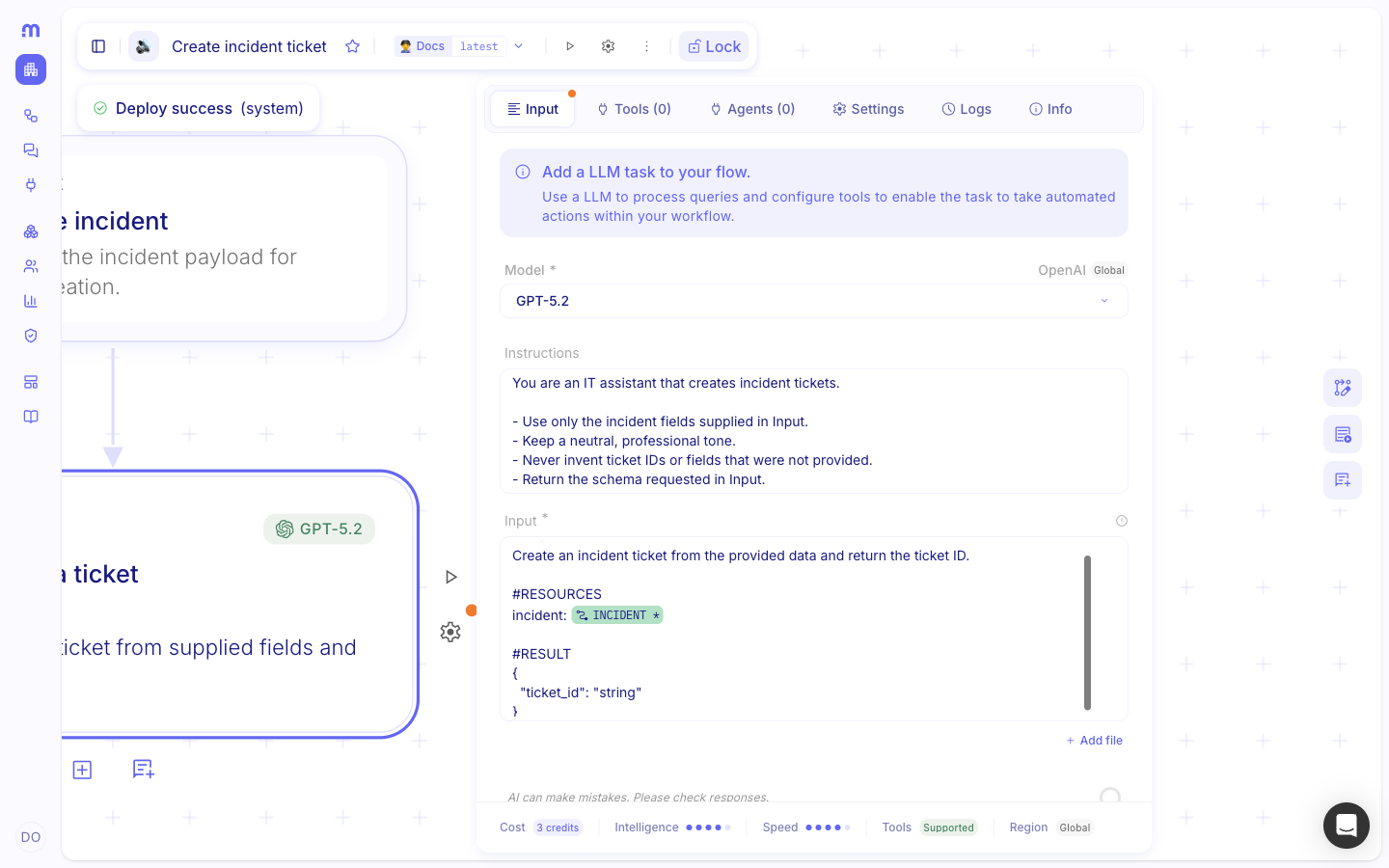
Insert run data with data pills
Section titled “Insert run data with data pills”When values come from a trigger, a previous step, or a variable, insert a data pill in Input — do not paste a snapshot of the payload into Instructions.
Place the cursor in Input. Under
#RESOURCES(or where the value belongs), leave a space after the label.Open the data picker. Type
/, choose the earlier step, then pick the field you need. Studio inserts a data pill that resolves on every run.Keep Instructions plain. If you need a value that changes per run, put it in Input with a data pill — not in Instructions.
Structure the Input field
Section titled “Structure the Input field”Inside Input, use short labeled blocks so the model can tell the job from the data and the required answer. The
rich text editor renders markdown while you type (for example # then Space for a heading). Headings, lists, tables,
and blockquotes are fine when they make the job clearer.
Keep each block short and explicit. Prefer #TASK for per-run steps. Keep lasting role and policy in Instructions.
Set Output format to JSON when you need parseable results
Section titled “Set Output format to JSON when you need parseable results”Prompt wording alone is not enough when the next step must read fields from the AI··Task result. On Settings, set Output format to JSON so the model returns a JSON object instead of prose or markdown fences. Keep Output format as Text (the default) for narrative answers such as a markdown report outline.
Availability depends on the selected model — see AI··Task: A simple guide.
Open Settings. Select the AI··Task, then open the Settings tab.
Set Output format. Choose JSON when downstream steps parse the result. Leave Text for markdown or free-form answers.
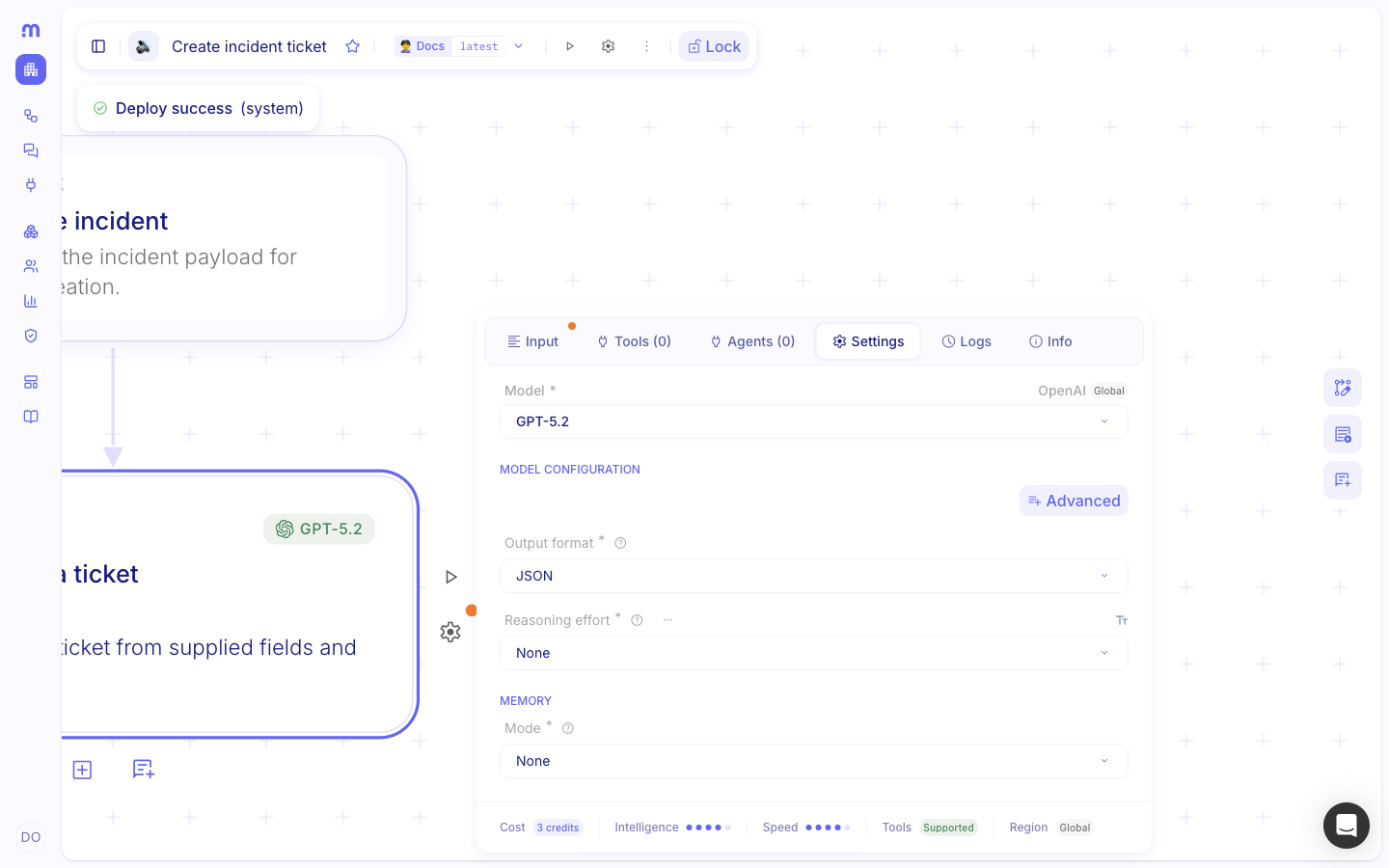
Keep
#RESULTaligned. In Input, still describe the JSON keys and types under#RESULT. Settings forces JSON;#RESULTdefines the schema the rest of the flow expects.
Prompt for tool use
Section titled “Prompt for tool use”When the AI··Task has integration tools, put standing rules for how to use those tools in Instructions. In Input, say which job to perform and which resource values to pass — use data pills for those values. When the result must be consumed as fields later, set Settings → Output format → JSON. Put tool-specific when-to-use guidance in the tool’s Description on the Tools tab. Attach the service, credential, and allowed operations before you rely on tool calls — see AI··Task: A simple guide.
You are a SOC analyst.
- Classify indicators using only tool results and the fields in Input.- Prefer the least-privilege operation that answers the question.- Do not invent verdicts or evidence. If the tool response is incomplete, say so in rationale.#TASK1. Look up the IP with VirusTotal.2. Classify the result as benign, suspicious, or malicious.3. Return the schema in #RESULT.
#RESOURCESip_address: [data pill from Receive alert · source_ip]
#RESULT{ "result": "benign | suspicious | malicious", "rationale": "short evidence from the tool response"}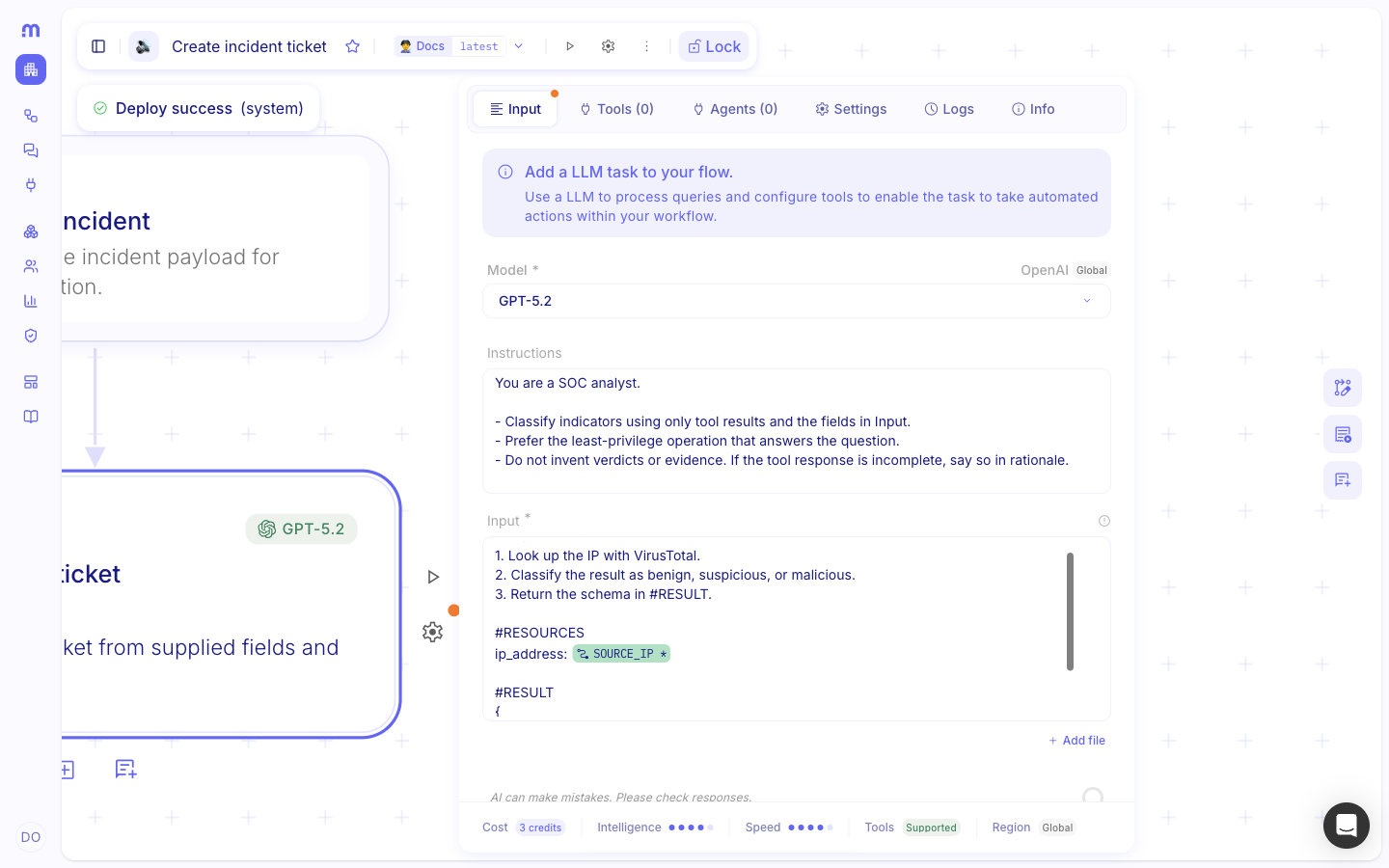
Follow prompt best practices
Section titled “Follow prompt best practices”Keep these rules whenever you maintain an AI··Task prompt:
- Keep the job description out of the case file. Role and constraints go in Instructions. This run’s data and data pills go in Input — so standing rules stay sticky and untrusted payloads stay disposable.
- Prefer data pills over pasted payloads. Type
/in Input for values from earlier steps. Keep Instructions free of pills and run payloads. - Be explicit. Name the exact fields, tools, and success criteria. Do not leave implied steps.
- Prioritize evidence. Tell the model to use only supplied fields and tool results. Do not invent facts that are not present. Distinguish confirmed facts from assumptions.
- Sequence actions. List tool calls in order when the job is multi-step (start session → run command → poll).
- Lock the output. For JSON consumers, set Settings → Output format → JSON, then define the keys in
#RESULT. For markdown reports, keep Output format as Text and lock the outline in#RESULT. - Document tool constraints. Note async APIs, required parameters, and similar operation names that are easy to
confuse — preferably in the tool Description, with a short reminder in
#RESOURCESwhen needed. - Handle missing data. Say that missing information is not proof that nothing happened. Ask for
needs_human_reviewor an explicit “insufficient information” outcome when fields are absent or conflicting.
{ "result": "benign", "rationale": "The hash is known and marked as safe in VirusTotal"}Example
Section titled “Example”Create a ticket ID
Section titled “Create a ticket ID”Instructions set the standing assistant behavior. Input carries this run’s ticket data (as a data pill in a real flow) and the JSON result. On Settings, set Output format to JSON. The static sample below is useful when you are drafting offline; in Studio, insert the incident pill from Receive incident.
You are an IT assistant that creates incident tickets.
- Use only the incident fields supplied in Input.- Keep a neutral, professional tone.- Never invent ticket IDs or fields that were not provided.- Return the schema requested in Input.#TASKCreate an incident ticket from the provided data and return the ticket ID.
#RESOURCESincident: [data pill from Receive incident]
#RESULT{ "ticket_id": "string"}Analyze a security incident
Section titled “Analyze a security incident”Example: standing analyst rules and severity definitions stay in Instructions. The incident payload, environment fields, and required output format go in Input — use data pills for live values. Keep Output format as Text for this markdown report.
You are a senior SOC analyst specializing in incident investigation, threat detection, and response.
Your goal is to analyze the provided security incident and determine its severity, likely cause, and recommendedresponse.
When analyzing an incident:- Identify the affected user, host, and resources- Extract relevant Indicators of Compromise (IOCs)- Determine the most likely attack technique- Map observed behavior to MITRE ATT&CK when possible- Distinguish confirmed facts from assumptions- Recommend concrete remediation actions
Prioritize factual evidence. Do not invent indicators or events that are not present in Input.Do not treat missing information as proof that an event did not occur. State when more investigation is required.
Severity:| Severity | Description | Expected response || Critical | Active compromise or major business impact | Immediate containment || High | Strong evidence of malicious activity | Investigate urgently || Medium | Suspicious activity requiring validation | Investigate || Low | Low-risk or informational activity | Monitor |#TASKAnalyze the incident and environment in #RESOURCES. Return only the sections in #RESULT.
#RESOURCESincident: [data pill from Receive incident]organization: [data pill]user: [data pill]hostname: [data pill]source_ip: [data pill]detection_source: [data pill]
#RESULTReturn markdown with these sections only:1. Summary — concise description of what happened2. Severity — Critical, High, Medium, or Low3. Evidence — key facts supporting the assessment4. MITRE ATT&CK — relevant techniques, if applicable5. Recommended actions — ordered by priority6. Confidence — Low, Medium, or HighClassify with a tool and rationale
Section titled “Classify with a tool and rationale”On Settings, set Output format to JSON so later steps can read result and rationale without parsing
prose.
You are a SOC analyst.
- Classify indicators using only tool results and the fields in Input.- Prefer the least-privilege operation that answers the question.- Do not invent verdicts or evidence. If the tool response is incomplete, say so in rationale.#TASK1. Look up the IP with VirusTotal.2. Classify the result as benign, suspicious, or malicious.3. Return the schema in #RESULT.
#RESOURCESip_address: [data pill from Receive alert · source_ip]
#RESULT{ "result": "benign | suspicious | malicious", "rationale": "short evidence from the tool response"}Keep in mind
Section titled “Keep in mind”- Structured Instructions + Input improves accuracy on multi-step tool jobs and keeps run data out of standing rules.
- When a later step must consume fields from the AI··Task, set Settings → Output format → JSON. Use
#RESULTto name the keys; do not rely on prompt wording alone to force JSON. - Keep Output format as Text for narrative or markdown reports.
- Instructions and Input store markdown. Rich text view and raw markdown view edit the same value.
- Instructions do not accept data pills. If a value must change per run, put it in Input.
- If Instructions is empty, the model still runs from Input alone — put role and rules there only when the Instructions field is unavailable.
- External prompting guides (for example vendor cookbooks) can supplement these blocks; they do not replace
Output format or
#RESULT.
Related
Section titled “Related”- AI··Task: A simple guide
- Build your first flow (data picker and data pills)
- OpenAI prompting guide for GPT-4.1