

Connect on-premise with Relay Agent
The Mindflow Relay Agent connects Studio flows to services on your private network. It runs
Cloudflare Tunnel (cloudflared) inside your infrastructure, opens outbound
tunnels, and exposes only the internal services you map. Mindflow provisions the tunnel token and service mapping; you
deploy and run the agent. There is no self-service Relay UI in Studio today.
When to use
Section titled “When to use”- Flows must call APIs that are only reachable inside your datacenter or VPC.
- You cannot (or should not) expose those APIs on the public internet.
- Prefer direct public SaaS integrations when the service already has a public API Mindflow can reach.
Before you begin, plan a host or container with at least 4 GB RAM and 4 CPU cores, outbound access for the tunnel ports below, and a contact path to Mindflow for the tunnel token and service mapping.
Understand how the relay works
Section titled “Understand how the relay works”The agent initiates outbound tunnels to Cloudflare. Mindflow reaches your internal tools through HTTPS endpoints protected with TLS and mutual TLS (mTLS). Only your Mindflow environment can use those endpoints. You choose which internal services to map.
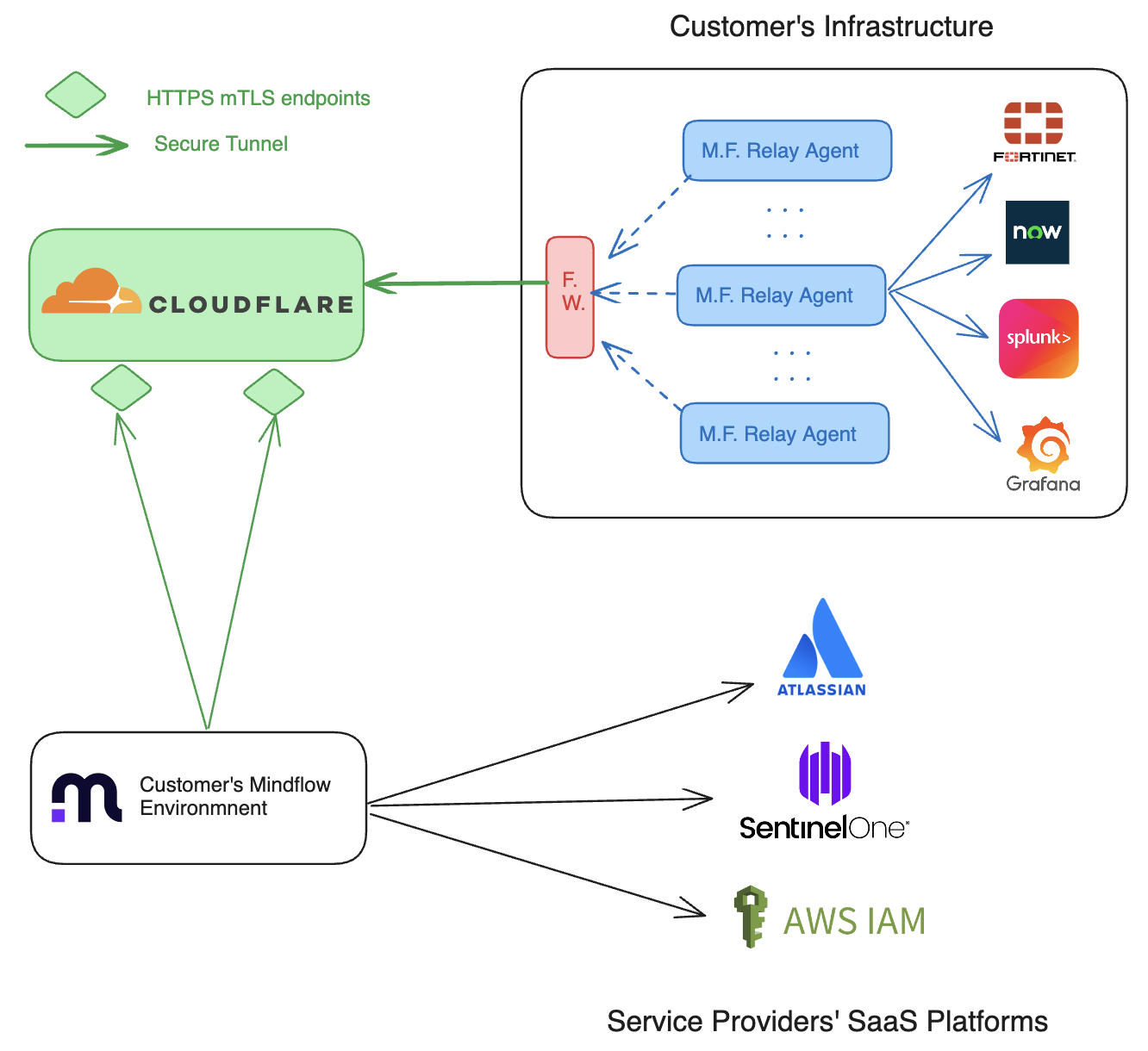
Prepare the network
Section titled “Prepare the network”Open outbound traffic so cloudflared can reach Cloudflare. Default tunnel protocol is QUIC; you can force
HTTP/2 with --protocol http2.
If your firewall filters by SNI, allow hostnames such as region1.v2.argotunnel.com, region2.v2.argotunnel.com,
cftunnel.com, and h2.cftunnel.com. Otherwise allow 198.41.200.0/24 and 198.41.192.0/24. See Cloudflare
Tunnel with firewall.
The agent must also reach the internal hosts you will map (Jira, Splunk, and similar).
Deploy the agent with your tunnel token
Section titled “Deploy the agent with your tunnel token”Download cloudflared from the
Cloudflare Zero Trust downloads
page, or use the cloudflare/cloudflared container image. Mindflow gives you a per-tunnel token—do not invent or
reuse a sample token from docs.
Get the token. Ask Mindflow for the tunnel token for your environment.
Install as a service (Linux example). Replace the token with the value Mindflow provided:
Install cloudflared service sudo cloudflared service install YOUR_TUNNEL_TOKENTo force HTTP/2 instead of QUIC, add tunnel run parameters per Cloudflare remote management.
Or run with Docker. Example for a local test:
Docker tunnel run docker run cloudflare/cloudflared:latest tunnel \--no-autoupdate \--protocol http2 \run \--token YOUR_TUNNEL_TOKENCompose example with two replicas:
docker-compose.yml services:cloudflared:image: cloudflare/cloudflared:latestcommand: tunnel --no-autoupdate --protocol http2 run --token YOUR_TUNNEL_TOKENdeploy:mode: replicatedreplicas: 2restart_policy:condition: any
Map internal services with Mindflow
Section titled “Map internal services with Mindflow”Service mapping creates Mindflow-managed URLs that only the platform can call. You supply internal URLs; Mindflow
registers the public-facing names (for example https://jira-your-tenant.mindflow.io) and wires them to the tunnel.
Example mapping table to share with Mindflow:
Test from a flow
Section titled “Test from a flow”After the agent is connected and mapping is live, use those Mindflow URLs (or the mapped service) in HTTP / integration steps and run a test call.
Example
Section titled “Example”A SOC needs CrowdStrike from a private management network. Ops deploys two cloudflared replicas with the Mindflow
token, shares https://cs-instance-01.internal.com:8484 for mapping, then a flow calls the Mindflow-facing CrowdStrike
URL without opening inbound firewall ports.
Keep in mind
Section titled “Keep in mind”- Connectivity uses a Cloudflare-issued tunnel token; restrict who can read it.
- Traffic between Mindflow and the agent is encrypted; sources are limited to Mindflow operating regions (for example AWS Europe Central and Europe West).
- For high availability, run multiple agent replicas (Cloudflare supports many connectors per tunnel). The agent keeps redundant long-lived connections to Cloudflare data centers.
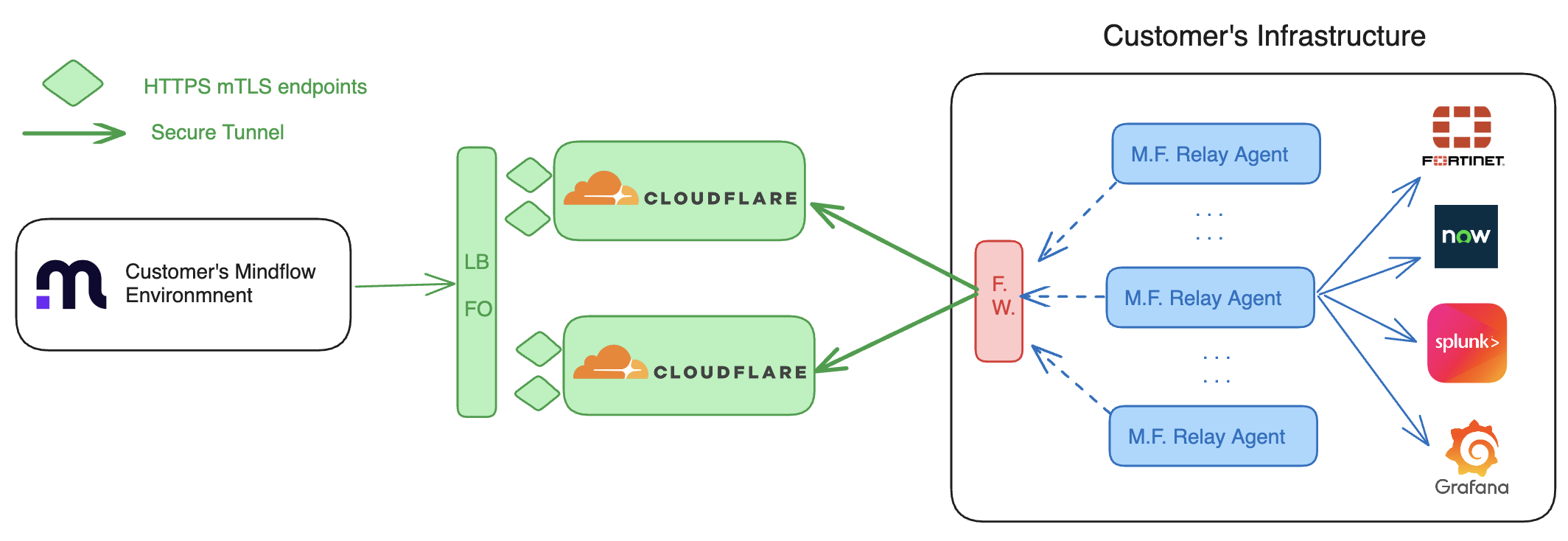
Related: Send raw HTTP requests, Call native integrations.
For help with tokens or mapping, contact contact@mindflow.com.