

Export audit logs
The audit logs Platform API returns a paginated, filterable history of actions in your Mindflow organization—flows,
deployments, credentials, permissions, and more. Org Admins copy the organization API Key from Studio, then call
GET /v1/audit-logs with that Bearer token. There is no export download button in Studio; use the API (or your SIEM
connector) to pull logs before they expire.
When to use
Section titled “When to use”- You need a machine-readable export for compliance, forensics, or a SIEM.
- You want to filter by category, time range, or selected fields.
- Prefer Studio run history and designer changelog when you only need interactive debugging inside one flow.
Before you begin, you need Org Admin rights to view the organization API key. Treat the key as an administrative secret—it can perform organization-level API actions, including log export.
Copy the organization API key
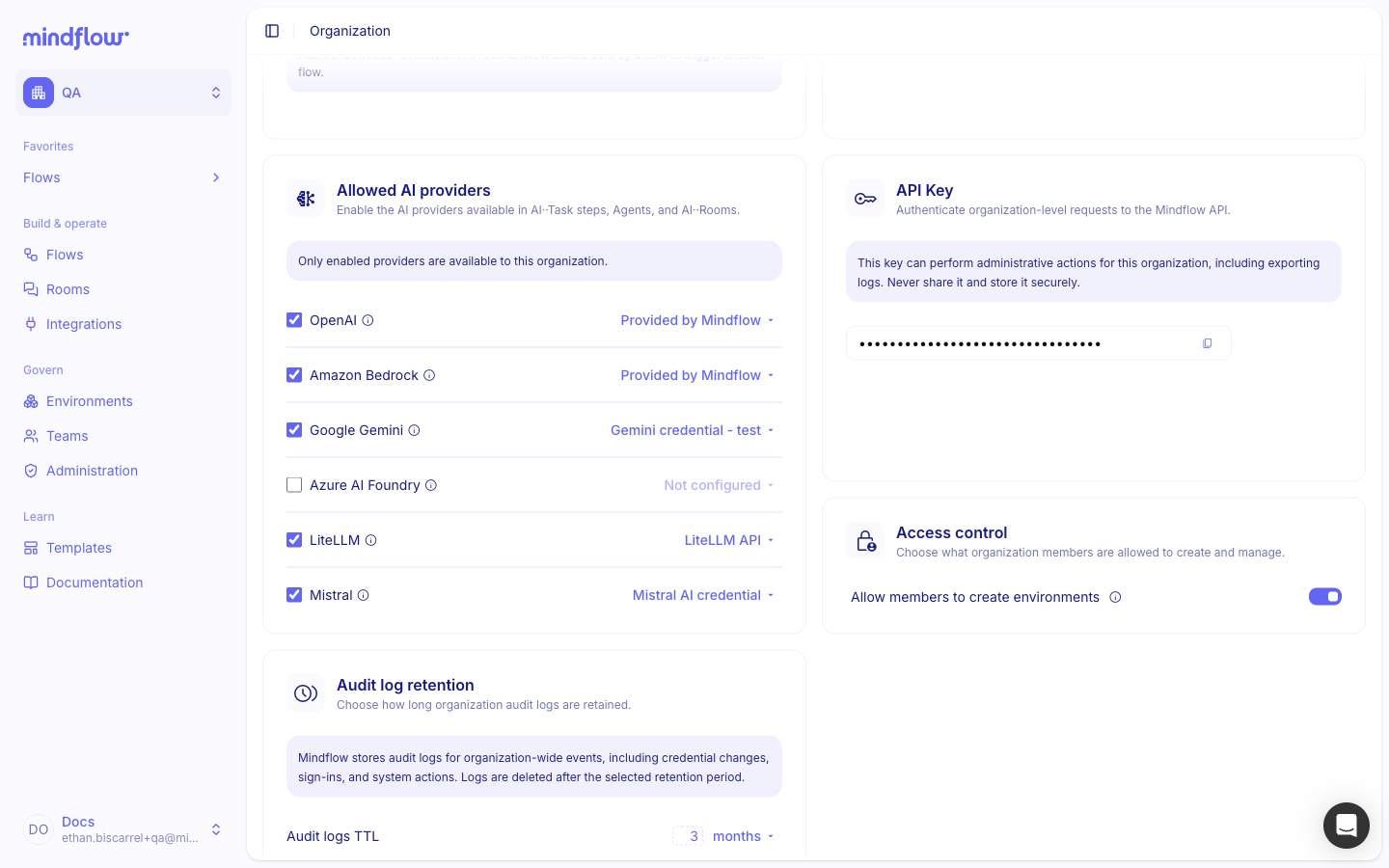
Section titled “Copy the organization API key”The API Key section on the Organization page authenticates organization-level Mindflow API requests.
Open Organization. In Studio, open your profile menu, then choose Organization.
Open API Key. Scroll to API Key and copy the key for use as a Bearer token. Store it in your secret manager—do not commit it to source control.
Call GET /audit-logs
Section titled “Call GET /audit-logs”Base URL: https://api-{tenant}.mindflow.io/v1 (replace {tenant} with your tenant slug). Some environments use a
different root domain—use the API host Mindflow gave you.
Every request needs:
Authorization: Bearer YOUR_ORGANIZATION_API_KEYRequests without a valid token receive 401.
List recent logs. Call the endpoint with your key:
Basic list curl -X GET "https://api-acme-corp.mindflow.io/v1/audit-logs" \-H "Authorization: Bearer $API_KEY"Filter by category (optional). Pass
categorywhen you only need one area:Filter by category curl -X GET "https://api-acme-corp.mindflow.io/v1/audit-logs?category=flow" \-H "Authorization: Bearer $API_KEY"Select fields and a time window (optional). Use
fields(max 6),afterorbefore(ISO 8601), andlimit(required withbefore/after):Fields and date window curl -X GET \"https://api-acme-corp.mindflow.io/v1/audit-logs?fields=auditLogId,category,timestamp&after=2024-03-19T00:00:00Z&limit=50" \-H "Authorization: Bearer $API_KEY"
Filter and paginate
Section titled “Filter and paginate”Allowed fields values: auditLogId, category, type, timestamp, expiresAt, metadata.
Categories: flow, flow-deployment, credential, environment, permission, mcp, team, organization.
Pagination strategies:
Results sort by timestamp (newest first). Max page size is 1000. If no logs match for a continuous 72 hours,
the API can return an empty page—keep paginating or widen the window.
Read the response
Section titled “Read the response”{ "auditLogs": [ { "auditLogId": "AUDI-57b858ed-ec60-4507-b2ef-ea58244ac742", "category": "flow", "type": "step_update", "timestamp": "2024-03-20T15:30:45.123Z", "createdAt": "2025-03-13T15:24:22.092Z", "expiresAt": "2025-03-27T15:24:23.379Z", "metadata": {} } ], "pagination": { "nextCursor": "eyJsYXN0S2V5IjoiMTIzNCJ9" }}Event types by category
flow-deployment
Section titled “flow-deployment”| Event type | Description |
|---|---|
deploy_queued | Flow deployment deploy queued |
deploy_started | Flow deployment deploy started |
deploy_completed | Flow deployment deploy completed |
deploy_failed | Flow deployment deploy failed |
run_queued | Flow deployment run queued |
run_started | Flow deployment run started |
run_completed | Flow deployment run completed |
run_failed | Flow deployment run failed |
step_run_queued | Flow deployment step run queued |
step_run_started | Flow deployment step run started |
step_run_completed | Flow deployment step run completed |
step_run_failed | Flow deployment step run failed |
| Event type | Description |
|---|---|
step_create | Creation of a new step in a flow |
step_update | Update to an existing step in a flow |
step_delete | Deletion of a step from a flow |
link_create | Creation of a new link between steps |
link_update | Update to an existing link between steps |
link_delete | Deletion of a link between steps |
flow_create | Creation of a new flow |
flow_update | Update to an existing flow |
flow_delete | Deletion of a flow |
flow_move | Moving a flow between environments |
flow_duplicate | Duplicating a flow |
import_export | Importing entities into the system |
ai_generate_flow_description | AI generation of a playbook description |
ai_generate_flow | AI generation of a flow |
revert | Reverting a changelog action |
permission, credential, environment, team, organization
Section titled “permission, credential, environment, team, organization”Shared lifecycle types: create_completed, create_failed, update_completed, update_failed, delete_completed,
delete_failed. Credentials also include update_value_completed, update_value_failed, get_completed, and
get_failed.
| Event type | Description |
|---|---|
invocation_completed | MCP JSON-RPC request completed successfully |
invocation_failed | MCP JSON-RPC request failed |
Handle errors and rate limits
Section titled “Handle errors and rate limits”Rate-limit response headers can include X-RateLimit-Limit, X-RateLimit-Remaining, X-RateLimit-Reset, and
Retry-After. Use backoff or a queue when you stream large exports.
Example
Section titled “Example”A compliance engineer copies the organization API key, then exports one day of flow events into object storage:
- Copy the API key from Organization → API Key into a secret store.
- Page with
afterandlimit. Start at midnight UTC; follownextCursoruntil it is null. - Write each page to durable storage before the entries hit
expiresAt.
Keep in mind
Section titled “Keep in mind”- Pull data before
expiresAtif you need long-term retention outside Mindflow. - Prefer small date chunks and
fields=when you only need ids and timestamps. - Audit metadata can include personal or sensitive data—protect the token and the export files.
Related: Monitor quotas, Manage permissions (RBAC).