

Handle API pagination
Many APIs return large result sets across multiple pages, using a cursor (or token/offset) to fetch the next batch. Mindflow has no dedicated pagination step—you build the pattern with flow Variables, a Loop, a Condition, API calls, and Transform data. Screenshots on this page use Slack users so you can see filled variables and transforms.
When to use
Section titled “When to use”- A list or search API returns a page of items plus a cursor, and you need every page in one run.
- Prefer a single API call when the full set fits on one page.
- Prefer Transform data and reassign variables when you only need to reshape data, not page an API.
Before you begin, open a flow in the designer with permission to edit it, and know how the target API names the cursor field in the request and response.
Declare flow variables
Section titled “Declare flow variables”Declare pagination state under flow Variables (Studio may label the panel Global variables) so values persist across loop iterations—not only inside a single step.
Open Variables. In the designer toolbar, open the settings control, then choose Variables.
Add a cursor variable. Name it (for example
cursor) and initialize it to a non-empty placeholder such as"[]"so a do-while loop runs at least once.Add a data accumulator. Name it (for example
data) and initialize it to"[]"so each page can append items.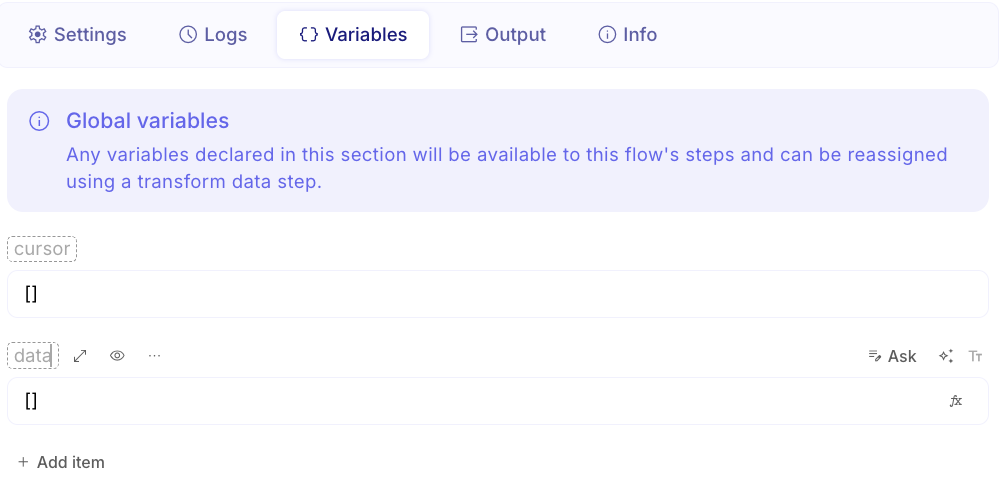
Loop while the cursor is set
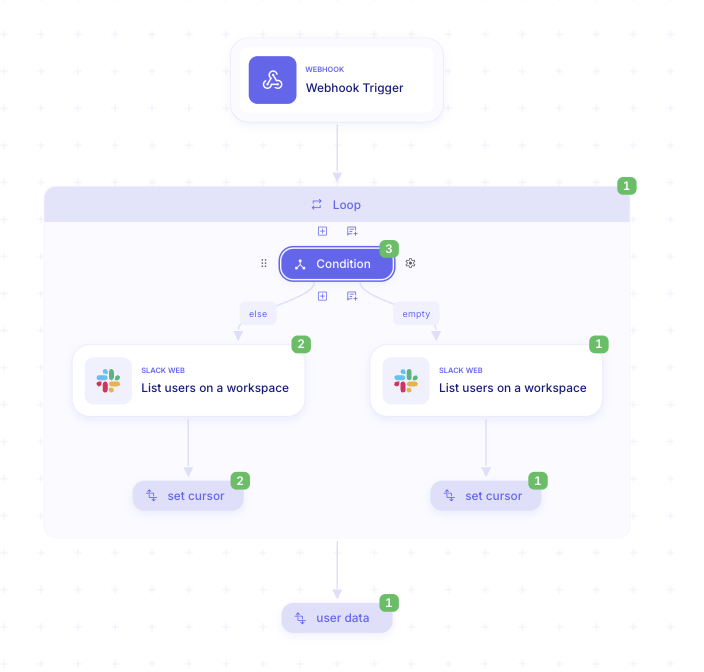
Section titled “Loop while the cursor is set”Use a Loop step with a Do while condition: keep running while cursor is not empty. Always set Maximum
iterations (for example 50) so a stuck API cursor cannot loop forever. The default maximum is 100; the upper
limit is 10000.
Add Loop. Open Add a step, choose Flow, then Loop. Place it where pagination should start.
Set Do while. Configure the condition so the loop continues while
cursoris not empty.Set Maximum iterations. On the Loop Settings, set Maximum iterations to a safe cap for your API.
Call the API for each page
Section titled “Call the API for each page”The first page often omits the cursor; later pages send the cursor from the variable. Inside the loop, use a
Condition on Iteration index equals 0 for the first call, and else for subsequent calls.
- Add Condition inside the Loop. Branch when Iteration index is
0(first page) versus later iterations. - Call without a cursor on the first page. On the first-page branch, call the list API without the cursor parameter.
- Call with the cursor afterward. On the else branch, send the cursor parameter from the
cursorvariable.
Accumulate results
Section titled “Accumulate results”After each API call, use Transform data to overwrite cursor from the response and append this page’s items to
data (for example with Array concat or Array push). The response path for the next cursor depends on the
API—check the vendor docs.
Add Transform data. After the API step(s) inside the loop, add Transform data from Flow.
Update cursor. Reassign
cursorto the next-page token from the response (or empty when there is no next page).Append items. Reassign
databy concatenating the current page’s items onto the accumulator.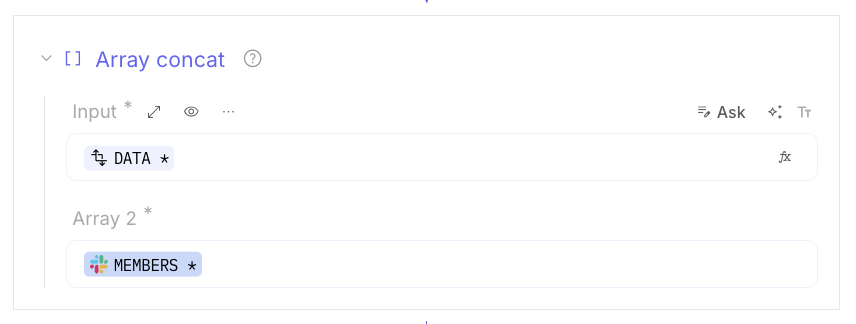
When the API returns an empty cursor, the do-while condition fails and the loop exits. data holds every item across
pages.
Verify the count
Section titled “Verify the count”After the loop, add a final Transform data step that uses Array length on data (for example into
data-length). Large accumulators can be hard to inspect in the UI; the length confirms how many items the loop
collected.
Add Transform data after the Loop. Create a variable such as
data-length.Apply Array length. Set the value to the length of
data.
Example
Section titled “Example”An IT operator collects every Slack user in the workspace. The flow Collect all Slack users declares cursor and
data, loops while cursor is set, calls Slack’s users list (no cursor on Iteration index 0, then with the
cursor), concatenates each page into data, and checks data-length after the loop.
Keep in mind
Section titled “Keep in mind”- There is no built-in “paginate” step—this pattern is the standard approach.
- Cursor field names differ by vendor; wrong paths are the most common failure.
- Always set Maximum iterations even when the exit condition should stop the loop.
Related
Section titled “Related”Transform data and reassign variables · Scripts, errors, and run control