

Run a script
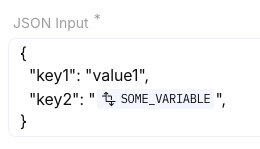
Run script is a built-in step that executes Node.js or Python 3 in a sandboxed runtime. You pass data as JSON Input, read it in the script, and return a JSON-serializable value for later steps. Screenshots on this page show a filled JSON Input and source editor.
When to use
Section titled “When to use”- Pre-built connectors and Transform data are not enough for complex logic, validation, or nested reshaping.
- Prefer Transform data and reassign variables for formula-based reshaping without custom code.
- Prefer a native integration when a vendor API already covers the job.
Before you begin, open a flow in the designer with permission to edit it.
Add Run script
Section titled “Add Run script”Run script lives under Built in in the Add a step catalog (not under Flow).
- Open Add a step. On the canvas, choose + where the script should run.
- Choose Run script. Under Built in, select Run script. Studio places the step on the canvas.
Choose a runtime
Section titled “Choose a runtime”On the step Input, open Source code and pick a runtime. Supported options are Node.js 24, Node.js 22, Node.js 18 (deprecated), and Python 3. Prefer Node.js 24 or Node.js 22 for new scripts.
- Open Input. Select the Run script step and open the Input tab.
- Select the runtime. Choose Node.js 24, Node.js 22, or Python 3. Avoid Node.js 18 unless you are maintaining an existing script—Studio marks it deprecated.
Pass JSON Input
Section titled “Pass JSON Input”Scripts do not read the rest of the flow state automatically. Put everything the script needs in JSON Input (plain
JSON or values mapped with the data picker). Inside the script, read that object as mindflowData (JavaScript) or
mindflow_data (Python).
Fill JSON Input. Set the field to the object the script should receive (default is
{}).
Read the input in code. Use the language binding for the runtime you chose.
const flowData = mindflowData["FIELD NAME"]flow_data = mindflow_data["FIELD NAME"]You can import standard modules for the runtime (for example json in Python, or Node’s built-in modules). You
cannot install arbitrary packages or import custom modules.
Return a value
Section titled “Return a value”End the script with return so later steps can use the result. Return only JSON-serializable content.
return myComputedDatareturn my_computed_dataAfter a successful run, later steps pick the Run script step in the data picker to read what you returned. You can dry-run the step from the step menu (Run) while designing.
Editor helpers
Section titled “Editor helpers”The source editor includes syntax highlighting, code completion, and full-screen mode (use the fullscreen control while editing).
Example
Section titled “Example”An operator normalizes ticket titles. The flow Normalize ticket title case uses Run script with Node.js 24.
JSON Input passes { "title": "urgent: reset vpn" }. The script reads mindflowData.title, returns a title-cased
string, and a later step uses that return value.
Keep in mind
Section titled “Keep in mind”- Each run is isolated, ephemeral, and restricted: no host OS access, no shell commands, no installing packages, and no uploading arbitrary binaries.
- For a platform-approved binary capability (for example OCR or PDF tools), contact Mindflow—those are evaluated case by case.
- On failure on the step Settings still controls whether a script error stops the run or continues (same options as other service steps).
Related
Section titled “Related”Transform data and reassign variables · Handle step errors · Scripts, errors, and run control