

JSON Path
Select values from a JSON document with a
JSONPath expression. Use it to
extract nested fields, array items, or filtered matches without reshaping the payload. Paths can use dot notation,
bracket notation, or a mix of both. JSON Path lives in the Data format category of the fx menu.
For aggregations, mapping, or building a new JSON shape, use JSONata instead.
Parameters
Section titled “Parameters”Input is the primary JSON document (previous step output or a literal). Flatten, Wrap, Quotes, and
Eval are toggles on the function card.
Returned value
Section titled “Returned value”Limitations
Section titled “Limitations”- Input and Path must be strings. Non-string Input raises
Invalid input. Non-string Path raisesInvalid path. - Input must be valid JSON. Malformed JSON raises a parse error.
- Filter expressions such as
[?(@.field)]require Eval to be on. With Eval off they raiseEval [?(expr)] prevented in JSONPath expression. - With Wrap off, no match returns an empty value. With Wrap on, no match typically returns
[]. - Quotes only strips wrapping quotes when the serialized result is a JSON string (a single string match with Wrap off).
Array results such as
["red"]are unchanged. - Large integer values are preserved when the result is stringified (for example, BSON-style IDs).
Examples
Section titled “Examples”Select a field
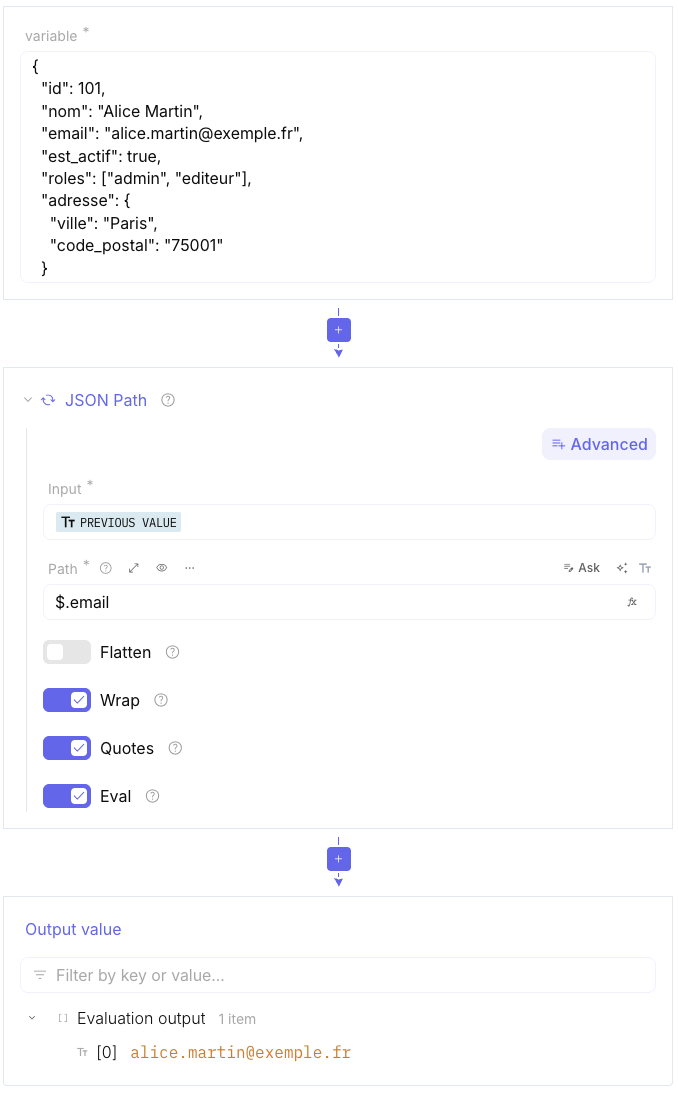
Extract a nested field from a JSON document — the most common JSON Path use in a flow. Pass the previous step’s JSON into Input, set Path to the field, and leave Wrap on so the result is a JSON array.
-
Set Input to the JSON from the previous step (or a literal document).
-
Set Path to the field to extract. Paste:
Path $.email -
Leave Wrap on and confirm Output value shows the match in a JSON array.
Return a raw string
Turn Wrap and Quotes off when you need the matched string without an array or JSON quotes. Use this when the result feeds another expression that should not escape quotes.
-
Set Input to a JSON document that includes the field to extract.
-
Set Path to the field. Paste:
Path $.email -
Turn Wrap off and Quotes off.
-
Confirm Output value is the bare string (no array brackets, no JSON quotes).
Filter matching items
Use a filter expression in Path to keep array items that match a condition. Eval must stay on. The default Wrap setting returns the matching values as a JSON array. See the JSONPath documentation for filter syntax.
-
Set Input to a JSON document that contains the array to filter.
-
Keep Eval on. Set Path to the filter expression. Paste:
Path $.store.book[?(@.price < 10)].title -
Confirm Output value lists the matching titles as a JSON array.
Flatten nested arrays
Turn Flatten on when the path returns arrays inside arrays and you need a single list of values.
-
Set Input to a JSON document with nested arrays.
-
Set Path to the nested array path. Paste:
Path $.groups[*].tags -
Turn Flatten on.
-
Confirm Output value is a single-dimension JSON array (for example
["a","b","c"]instead of[["a","b"],["c"]]).