

Conan
Introducing large JSON processing
Section titled “Introducing large JSON processing”Large JSON data processing (beta) 🐘
Section titled “Large JSON data processing (beta) 🐘”Ref: #3353, #3354, #3813, #3572, #3691
We’re excited to announce a significant upgrade in our data handling abilities! Mindflow can now process datasets up to 20MB. This enhancement breaks previous limitations, paving the way for new use cases like large-scale data conversion and transfer.
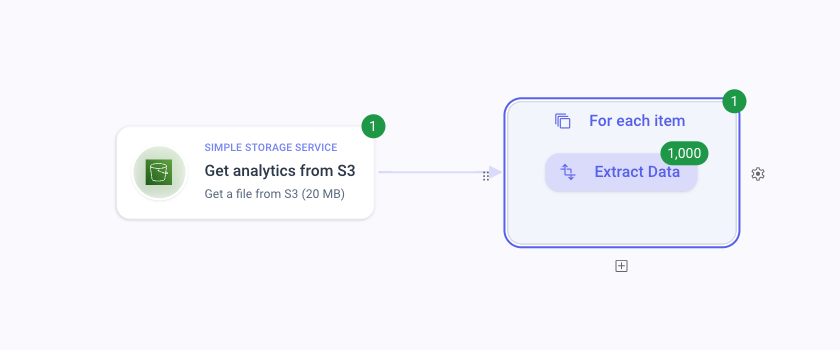
For seamless management of large datasets, simply select your data as you normally would. If you encounter datasets that exceed the usual size, a special button Load data will appear, allowing you to continue viewing them.
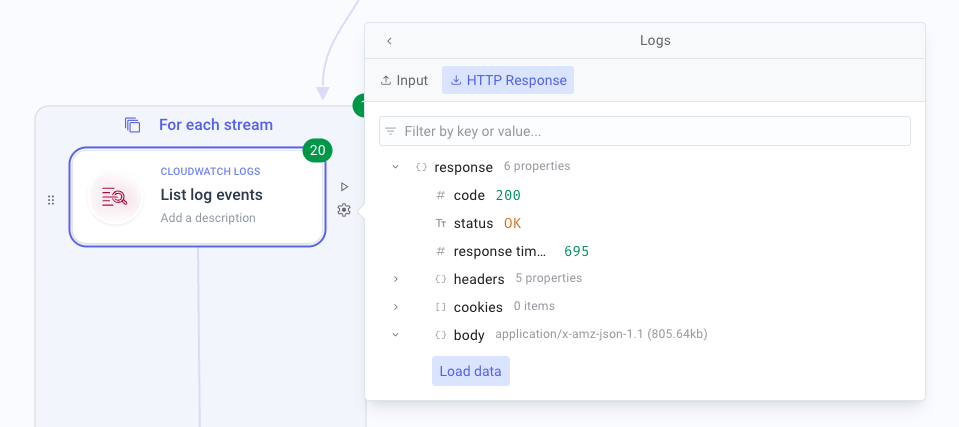
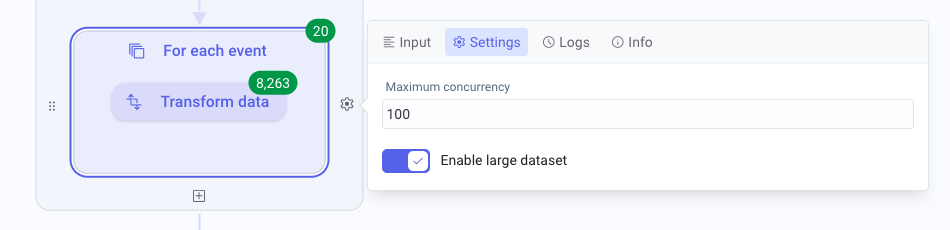
When working with large datasets in a ‘For each’ loop, there’s a crucial setting to note: Enable large dataset. Activate this option to ensure optimal performance with bigger data sizes.
CHANGES
Section titled “CHANGES”Various 🍒
Section titled “Various 🍒”- 🌐 New integrations available (#3693, #2684, #3679, #3663, #3612, #3284, #1791): PingCastle, OpenTracker, Cortex Xpanse, SecurityTrails, ThreadStop, Tessian, and JAMF latest version
- Fixed issue with pasting webhook response flows (#3806)
- Editable titles for objects with additional properties (#3789)
- Enhanced AI flow generation: Resolved empty flows, disconnected flow segments, improved error messages, and visual improvements (#3716, #3322, #3753)
- Improved JSON viewer for deeply nested objects (#3583)
- Resolved duplication of “else if” conditions in specific cases (#3655)
- Enhanced logs navigation and updated badge display (#3711, #3730, #3735)
- Aligned 3-dot button in step settings (#3594)
- Fixed resume functionality in “For each” loops with “Enable large dataset” option (#3332)
- Updated various vendor logos (#3686)
- Fixed Agicap integration issues (#3754)
- Corrected unexpected step failure badges (#3580)
- Improvements in AI workspace: Automatic layout optimization, faster response times, and improved titles (#3702, #3715)